Best AI Video Generator Tools in 2026: 8 Platforms Tested for Every Creator Type

Disclosure: This post may contain affiliate links. If you purchase through these links, we may earn a small commission at no extra cost to you.
TL;DR
- AI video generation has crossed the "production-ready" threshold. Tools now produce 4K footage, native audio, and character consistency across scenes.
- Google Veo 3.1 sets the current quality ceiling for cinematic text-to-video generation, available via the Google AI Pro plan at $19.99/month.
- Kling 3.0 offers the best price-to-quality ratio for professional workflows at $0.07–$0.10 per second.
- HeyGen is the top pick for business use: avatar-led video in 40+ languages with natural lip-sync.
- Runway Gen-4.5 remains the professional standard for creative control and VFX.
- Note: OpenAI discontinued Sora's web and app experience in April 2026. Sora 2 is now API-only.
Table of Contents
- How AI Video Changed in 2026
- What to Look For Before You Pick a Tool
- The 8 Best AI Video Generators: Detailed Reviews
- Comparison Table: All Tools at a Glance
- Which Tool Is Right for You?
- Pricing Reality: What You Actually Pay
- Conclusion
- Related Articles
- FAQ
1. How AI Video Changed in 2026 {#changed}
Twelve months ago, AI video generation was still in the "impressive demo, not yet production-ready" zone. The clips were short (often under 10 seconds), often watermarked, and almost always silent. Characters lost consistency between shots. Physics looked wrong. Nobody was actually shipping AI video in client deliverables.
That changed fast. The AI video generator market is projected to grow from $716.8 million in 2025 to over $2.5 billion by 2032 — a trajectory that reflects genuine production adoption, not hype. According to Wyzowl's 2026 survey, 91% of businesses now use video as a marketing tool, and the bottleneck has shifted from production cost to creative capacity.
In 2026, the leading tools can now produce:
- Native 4K resolution with physically accurate lighting and texture
- Synchronized native audio — dialogue, sound effects, and ambient soundscapes from a text prompt, no separate audio production required
- Character consistency across multiple shots and scene changes
- Multi-shot sequences with camera movement control
- Audio lip-sync for avatar-based content in 40+ languages
The gap between "AI video" and "real video" is narrowing faster than most people expected. If you haven't seriously looked at these tools in the last six months, what you remember is already outdated.
2. What to Look For Before You Pick a Tool {#criteria}
With dozens of platforms on the market, the wrong framework leads to expensive wrong turns. Before comparing tools, nail down four questions:
1. What's your primary use case?
Social media clips, corporate training videos, cinematic ads, and avatar-based explainer content are all different problems that different tools solve. A tool great for TikTok Shorts is often mediocre for boardroom presentations.
2. Do you need native audio?
Native audio generation — where the AI creates dialogue, ambient sound, and effects synchronized with the video — is now available in the top-tier tools. But it significantly raises per-second generation costs. If you're adding your own voiceover separately, you're paying for a feature you don't need.
3. How important is character consistency across shots?
Generating one great clip is easy. Generating six clips where the same character, lighting, and setting stay consistent — so you can cut them together into a coherent story — is hard. Only a few tools in 2026 handle this reliably.
4. Are you on subscription or pay-per-second?
The AI video market has split into subscription plans (predictable monthly cost, credit limits) and API-based pay-per-second billing ($0.05–$0.40 per second of generated video). For sporadic users, pay-per-second is often cheaper. For production teams with consistent output needs, a subscription with enough credits is usually better value.
3. The 8 Best AI Video Generators: Detailed Reviews {#reviews}
🥇 Google Veo 3.1 — Best Cinematic Quality
Access: Google AI Pro plan ($19.99/month) | Enterprise via Vertex AI
Released January 2026, Veo 3.1 currently sets the quality ceiling for raw AI video generation. The "Ingredients to Video" feature — where you provide up to four reference images and the model maintains pixel-perfect subject identity across scene changes — solves one of the hardest problems in AI video: keeping your characters looking the same from shot to shot.
What makes Veo 3.1 stand out in 2026:
Native audio generation: Veo 3.1 generates synchronized dialogue, sound effects, and ambient soundscapes directly from the text prompt. For marketing teams and content creators, eliminating the audio post-production step alone justifies the tool.
Native 4K resolution: Competitive tools often cap at 1080p or require expensive tier upgrades for 4K. Veo 3.1 outputs 4K natively across plans.
Character consistency via reference images: The four-reference-image system maintains subject identity through scene changes — a breakthrough for multi-shot content.
Best for: Marketers, production teams, and creators who need the highest visual quality for commercial content.
Limitation: Accessible only through the Google AI Pro plan or Vertex AI enterprise. No standalone Veo subscription exists, which means you're also paying for Google's broader AI suite.
🥈 Kling 3.0 — Best Price-to-Quality Ratio
Price: $0.07–$0.10 per second | Free tier available
Kling 3.0, released February 2026, is the production-grade AI video generator most professional creators actually use day-to-day. It delivers realistic lighting, strong texture detail, physically believable motion, and excellent fabric simulation — at a cost that makes commercial workflows financially viable.
The multi-shot sequence feature (3–15 second sequences with consistent subject across different camera angles) and multi-character native audio with voice reference are the 2026 additions that moved Kling from "good" to "essential" for professional video producers.
At $0.07–$0.10 per second, Kling offers the strongest price-to-quality ratio on the market. A 30-second commercial-quality clip costs roughly $2–$3. That's a fraction of what equivalent stock footage would cost, and it's custom.
Best for: Professional creators, marketers, and agencies producing commercial-grade content at volume. Ideal when you need consistent quality at sustainable cost.
Limitation: The credit system and tier structure require more attention than flat-rate subscriptions. Unused credits don't roll over on some plans.
🥉 Runway Gen-4.5 — Best for Creative Control and VFX
Price: Free (125 one-time credits) | Standard $15/month (625 monthly credits) | Unlimited options available
Runway remains the professional standard for creators who need granular creative control over their AI video output. Gen-4.5's Act Two feature is the headline: it lets you record traditional camera footage of a human actor, then paste that performance into an AI character. Real human expression and movement, AI visual rendering.
The advanced character animation tools — full-body tracking including hands and fingers, expression control, and the camera movement specification system — give Runway a depth of control that simpler prompt-and-generate tools lack.
Runway also integrates directly into Zapier workflows, enabling automated video generation pipelines based on triggers in your project management tools, CRM, or content calendar. For production operations with regular, template-driven video needs, this automation capability has significant time-value.
Best for: Creative directors, VFX-focused content producers, and teams that need automation integration for systematic video content production.
Limitation: The credit economy is complex. The free 125 credits disappear fast when you're testing. The Standard plan's 625 monthly credits translate to roughly 6–10 minutes of generated video — workable for regular use but not high-volume production.
💼 HeyGen — Best for Business and Avatar-Based Video
Price: Free (3 videos/month) | Creator $29/month | Team $39/seat/month (4K export)
For corporate communications, training, and multilingual marketing content, HeyGen is the standout choice. The platform's core strength is avatar-led video: AI-generated presenters that look and move like real people, speaking your script in 40+ languages with natural lip-sync.
Recent HeyGen updates added generative B-roll, an upgraded AI Studio Editor with improved expression control, and voice customization tools. For teams producing training walkthroughs, product demos, or marketing content that needs to localize across multiple languages, HeyGen's production speed is transformative.
The interactive avatar feature — where HeyGen creates personalized, dynamic video experiences — is opening new workflows for sales outreach and customer onboarding that static avatar tools can't match.
Best for: Corporate communications teams, sales organizations, HR departments, and any business producing localized video content at scale.
Limitation: Avatar video has a visual ceiling — it doesn't look like live-action cinematography. For brands where production quality in the traditional sense matters, HeyGen's output requires transparent communication with audiences about AI generation.
🎓 Synthesia — Best for Enterprise Training Content
Price: Free tier available | Enterprise custom pricing
Synthesia is the market leader for corporate training video at enterprise scale. The platform specializes in AI presenter-led training content — think compliance training, product onboarding, and employee education — with a workflow built for L&D (Learning and Development) teams, not individual creators.
The text-to-video pipeline for training content is the most refined on this list for its specific use case. Script your training module, assign an AI presenter, select background and language, and Synthesia generates the video. Update the script? Regenerate the affected segments without reshooting. This editing capability dramatically reduces ongoing maintenance costs for training content libraries.
Best for: Large organizations with ongoing training content needs, particularly those requiring consistent content updates across a multi-language employee base.
Limitation: Priced for enterprise budgets, not individual creators. The presenter-forward format isn't appropriate for cinematic or brand advertising content.
✂️ Descript — Best for Video Editing with AI
Price: Free (1 transcription hour) | Hobbyist $24/user/month (10 hours transcription, 1080p)
Descript approaches video from the editing direction rather than the generation direction. The core workflow: record a video, Descript transcribes it automatically, then you edit the video by editing the text transcript. Delete a sentence from the transcript — the corresponding video section disappears.
The AI additions have made this workflow significantly more powerful. The Underlord toolkit auto-removes filler words, runs automatic multicam switching to whoever's speaking, and generates highlights and social clips automatically. Studio Sound upgrades recorded audio to production quality without a recording booth.
For podcasters, YouTubers, and anyone producing regular recorded content, Descript is the most time-efficient editing environment available.
Best for: Content creators, podcasters, and teams that record and edit video regularly — rather than generating it from text.
Limitation: Not a video generation tool in the text-to-video sense. If you need to create footage that doesn't exist, Descript isn't the right choice.
🎨 Adobe Firefly (Video) — Best for Commercial-Safe Output
Price: Free (2 video generations/month) | Firefly Standard $9.99/month (2,000 generative credits)
Adobe Firefly Video's defining advantage isn't quality — it's legal clarity. Adobe trains Firefly exclusively on licensed content, meaning every generated video comes with clear intellectual property rights and commercial use guarantees. For brands running paid campaigns, agencies managing enterprise accounts, and organizations with legal review processes, this distinction matters enormously.
The Creative Cloud integration means Firefly sits inside the editing environments teams already use — Premiere Pro, After Effects — rather than requiring a context switch to a separate platform.
Best for: Brands, agencies, and legal-sensitive organizations that need commercial-grade AI video with documented IP protection.
Limitation: Quality lags behind Veo 3.1 and Kling 3.0. You're paying a quality premium for legal safety, which is the right trade-off for some use cases and the wrong one for others.
📱 InVideo AI — Best for Social Media Content
Price: Free tier | Paid plans available
InVideo AI is purpose-built for short-form social content. Describe the video you want, specify the platform (Instagram Reels, YouTube Shorts, TikTok, LinkedIn), and InVideo generates a complete video — script, voiceover, footage, captions, and music — from the initial prompt.
For businesses needing consistent social media presence without dedicating editorial and production resources, InVideo handles the full production stack in a single workflow. The platform intelligence around platform-specific format requirements (aspect ratio, caption style, length) saves significant time versus configuring other tools for each platform manually.
Best for: Small businesses and marketers who need regular social media video content without a production team.

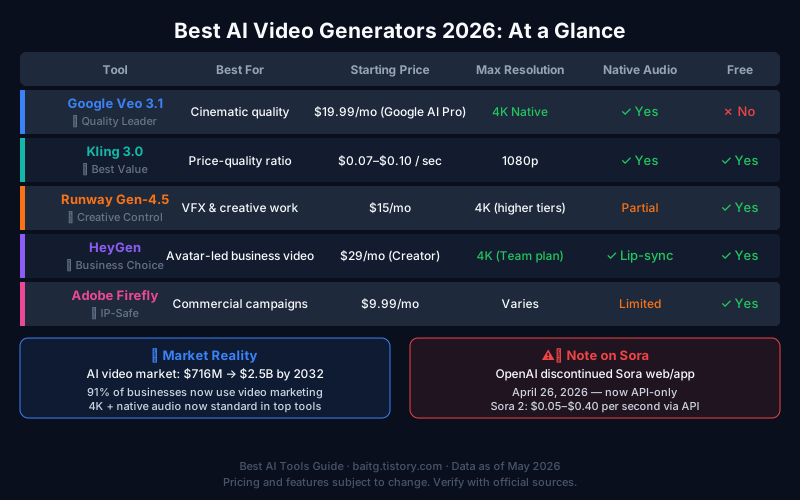
4. Comparison Table: All Tools at a Glance {#comparison}
| Tool | Best For | Starting Price | Max Resolution | Native Audio | Free Tier |
|---|---|---|---|---|---|
| Google Veo 3.1 | Cinematic quality | $19.99/mo (Google AI Pro) | 4K | ✅ | ❌ |
| Kling 3.0 | Price-to-quality ratio | $0.07/sec | 1080p | ✅ | ✅ |
| Runway Gen-4.5 | Creative control & VFX | $15/mo | 4K (higher tiers) | Limited | ✅ (125 credits) |
| HeyGen | Business avatar video | $29/mo | 4K (Team plan) | ✅ (lip-sync) | ✅ (3 videos) |
| Synthesia | Enterprise training | Custom | 1080p | ✅ | ✅ |
| Descript | Editing existing video | $24/mo | 1080p | Via editing | ✅ (1hr) |
| Adobe Firefly | Commercial-safe output | $9.99/mo | Varies | Limited | ✅ (2 videos) |
| InVideo AI | Social media clips | Free tier available | 1080p | ✅ | ✅ |
5. Which Tool Is Right for You? {#which}
Match your use case to the right tool directly:
| Use Case | Recommended Tool | Why |
|---|---|---|
| Highest visual quality for ads/film | Google Veo 3.1 | Best-in-class motion, 4K, native audio |
| Production volume with quality balance | Kling 3.0 | Best price-to-quality, multi-shot support |
| Corporate training content | Synthesia | Built for L&D workflows at scale |
| Multilingual avatar-led marketing | HeyGen | 40+ language lip-sync, fastest output |
| Creative VFX and character animation | Runway Gen-4.5 | Advanced control, Act Two performance cloning |
| Editing recorded video with AI | Descript | Transcript-based editing is unique |
| IP-safe commercial campaigns | Adobe Firefly | Only fully licensed training data |
| Regular social media clips | InVideo AI | Platform-optimized full-stack production |
The "I just want to try AI video" entry point in 2026 is Google Veo 3.1 via the Google AI Pro plan. At $19.99/month, you also get Google's broader AI suite including Gemini 3.1 Pro, Deep Research, and 2TB of cloud storage. For evaluating the quality ceiling without committing to a specialized platform, this is the best deal on the list.
6. Pricing Reality: What You Actually Pay {#pricing}
AI video generation pricing is genuinely complex because it mixes subscription plans, credit limits, and per-second generation costs that don't translate cleanly to each other. Here's the practical math:
For a 30-second commercial clip:
- Kling 3.0: ~$2–$3 (API, $0.07–$0.10/sec)
- Veo 3.1: Included in Google AI Pro plan credits
- Runway Standard: ~6–10 clips/month within plan
For a 5-minute training video (via Synthesia or HeyGen):
- HeyGen Creator: $29/month for unlimited videos
- Synthesia: Enterprise custom pricing based on volume
For social media at volume (10+ clips/week):
- InVideo AI: Entry plan covers moderate volume
- Kling 3.0: Most cost-efficient at $0.07/sec for regular production
The pricing landscape is converging toward $15–$30/month for substantive creative use, with the best per-unit economics shifting to API-based per-second billing for teams with consistent high-volume needs.
7. Conclusion {#conclusion}
AI video generation in 2026 is no longer a novelty — it's a production tool with real commercial applications. The question isn't whether these tools are good enough; the question is which tool solves your specific problem.
For individual creators and small teams exploring cinematic video quality, Google Veo 3.1 via the Google AI Pro plan offers the best combination of quality, native audio, and accessible pricing. For production teams with consistent high-volume needs, Kling 3.0's price-to-quality ratio is hard to beat. For businesses needing avatar-led multilingual content, HeyGen is the professional standard.
The most important thing the 2026 market has made clear: the tools specializing in one thing — cinematic quality, business avatar, SEO content, fiction structure — dramatically outperform general-purpose generators in their lanes. Pick the tool for your lane, not the one with the longest feature list.
Related Articles {#related}
- Best AI Image Generators in 2026: Midjourney, ChatGPT, Ideogram & More
- How to Use AI for Content Creation: 6 Practical Workflows
- Best AI Tools for Marketing in 2026: The Stack That Actually Works
FAQ {#faq}
Q1: Is Google Veo 3.1 available to everyone?
Veo 3.1 is accessible through the Google AI Pro plan at $19.99/month, which includes the broader Google AI suite. Enterprise access with higher volume limits is available through Google Cloud's Vertex AI. There is no standalone Veo subscription separate from the Google AI ecosystem.
Q2: Did OpenAI shut down Sora?
OpenAI discontinued the web and app Sora experience on April 26, 2026. Sora 2 is now available exclusively through the API at $0.05–$0.40 per second depending on resolution and audio settings. Developers can continue using it, but the consumer-facing product is gone.
Q3: What is the cheapest AI video generator that produces professional results?
Kling 3.0 at $0.07–$0.10 per second offers the best quality-to-cost ratio for professional production. A 30-second clip costs approximately $2–$3. Free tiers from HeyGen (3 videos/month) and Runway (125 one-time credits) let you test quality before committing to a paid plan.
Q4: Can AI video generators create talking-head videos with real-sounding voices?
Yes. HeyGen and Synthesia both produce avatar-led content with natural lip-sync in 40+ languages. The output has improved significantly in 2026 — while it doesn't look identical to live-action video, the quality is sufficient for training content, internal communications, and many marketing use cases.
Q5: Do I need video editing skills to use these tools?
Most tools — InVideo AI, HeyGen, Synthesia — are explicitly designed for non-editors and handle the full production pipeline from prompt to finished video. Tools like Runway and Descript reward users with some editing background who want more control over the final output.
Disclosure: This post may contain affiliate links. If you purchase through these links, we may earn a small commission at no extra cost to you.


